WeMarket delivers record results and invests in the future
WeMarket ends 2024 with the highest gross profit in its history and a bottom line result of 3.1 million.
Get tips on how to prepare your webshop for the Christmas season and optimise your shop to attract more customers and maximise sales during the busiest time of the year.

I love Christmas. It is a cosy time filled with wonderful gatherings of family and friends, fires in the fireplace, and festive treats. On the other hand, I am not a fan of running around crowded department stores searching for presents for my nearest and dearest. It is a chaotic mix of impatient children and stressed parents entangled in wrapping ribbons. If you are anything like me, you will do almost anything to avoid just that.
That is why you do your Christmas shopping online. It gives you peace and time to find the right gifts, and you can even do it from your sofa while enjoying a Danish doughnut and a cup of hot chocolate!
However, when Christmas shopping moves online, consumers give up some control. Will the perfect presents arrive before Christmas Eve? Will they be nicely wrapped? And if the gift is not quite right, can it be returned after Christmas?
As a webshop owner, you need to be proactive in addressing these questions, and here are a few tips on how you can do just that!
When Christmas shopping happens online, answers to the questions above become crucial in determining which webshops receive the most orders. You will do yourself and your webshop a huge favour by informing your visitors about:
Present this information as clearly as possible, both on your homepage AND in your checkout process.
If you do not meet your visitors’ need for clarification, you will likely lose a lot of sales or spend most of December responding to customer enquiries about these very topics.
How can you stay ahead of the curve?
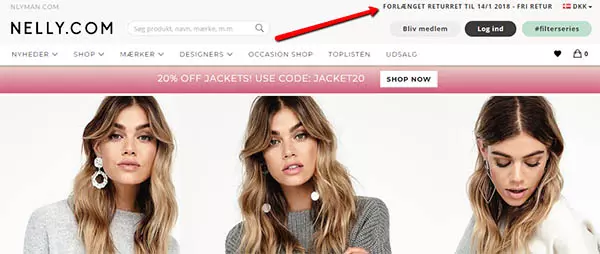
There are several ways to do this. For example, you can gather all the important information in a top bar that is visible on every page of your webshop. See an example of a top bar on www.nelly.com below:
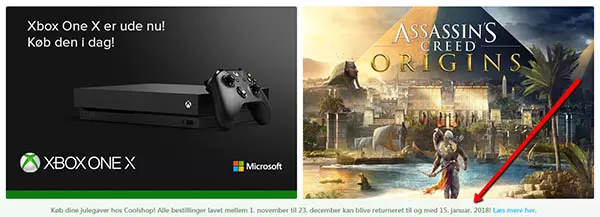
You can also present your key information in a fixed bar at the bottom of your webshop. A fixed bar means it remains visible even as the visitor scrolls down your page. www.coolshop.dk has done this in the example below:
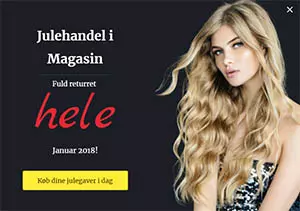
If you want to be absolutely certain your visitors are aware of what to expect when shopping on your webshop, you can add a pop-up like this one:
A pop-up is essentially a miniature page that appears on the screen, for example, when a visitor is about to leave your site, or after they have been browsing for a certain amount of time. You can tailor your pop-ups (Sleeknote is a great tool) so they communicate exactly what you want, at exactly the right moment.
Do not forget the checkout
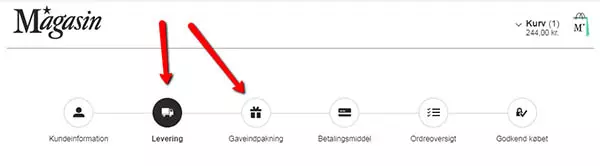
Even if you have answered your visitors’ questions on your site, it is crucial at checkout to reassure them that their beautifully wrapped gifts will arrive on time and can be returned, for example, until mid-January. This gives the final sense of security before the customer is ready to enter their card details and hit ‘pay’.
Here is an example of the checkout flow at Magasin:
Nu du har gjort dit for, at forbrugerne køber deres julegaver i din webshop, gælder det om at gøre det let for dem at finde det, de leder efter.
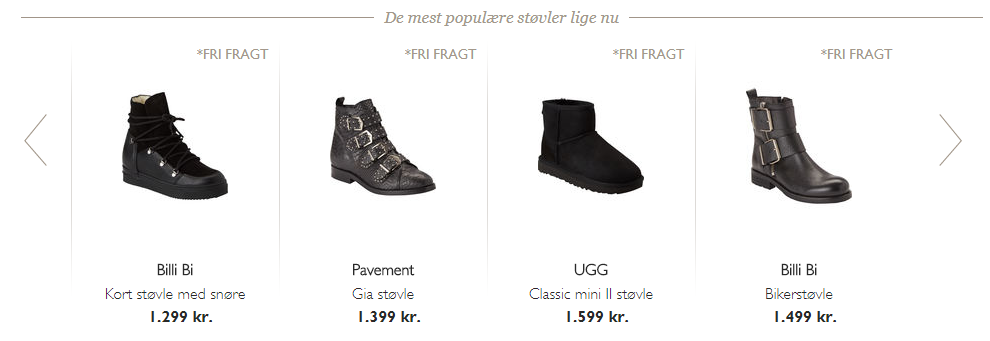
Som mennesker lader vi os ofte inspirere af andre mennesker, og derfor kan du lette forbrugernes købsproces ved at præsentere dem for en liste med de mest populære produkter på din webshop. Denne liste kan fx kategoriseres efter køn og aldersgruppe, alt efter hvilke produkter du sælger.
Her ser du endnu et eksempel fra nelly.com:
Once you have presented your visitors with your most popular products and they have hopefully added some to their basket, you can try upselling.
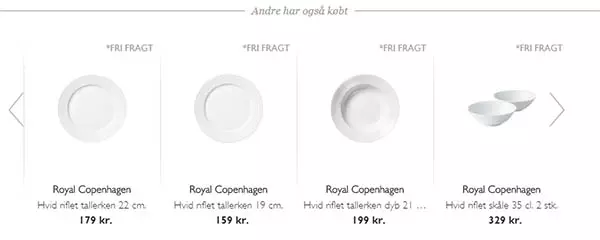
This takes place at checkout, when the customer almost has completed their purchase. The wallet may already be out and card details entered, so do not miss the chance to encourage an extra gift or two into the basket. At checkout, it is a very good idea to present the customer with offers or new products in the same category as what they have already chosen.
See another example from Magasin here:
This way, you increase the likelihood of a bigger purchase, and the extra effort you have put into free shipping, gift wrapping, and extended returns until mid-January will really pay off.
Today, as consumers, we spend more time online than offline, mostly thanks to social media. If your webshop has a profile on, for example, Facebook or Instagram, it is a good idea to update all your text to include information about your Christmas shopping service. You can also change your cover and profile images to highlight the level of service customers can expect from you during the festive season.
If you are running special Christmas campaigns in your webshop and your target audience is on Facebook, it is also a good idea to advertise with various ads before and during December.
Google Ads are the adverts that appear at the top of the search results when you search for something on Google. If you promote your webshop using Google Ads, do not forget to update your adverts before the Christmas season begins. Once again, it is all about attracting customers to your webshop, not only with great products and offers, but also by answering their questions in advance.
Therefore, your ad copy and extensions should also focus on delivery times, methods, and your returns policy.
Our Google Ads experts are ready to help – contact us >>
With that said, all that remains is to wish you good luck with your webshop’s Christmas trading!
– Feliz Navidad!
Read more – what you can do if you receive few or almost no orders in your webshop.
At WeMarket, we offer businesses a benchmark report that compares their marketing efforts with their key competitors. You decide which competitors we should compare against.
We specialise in selling physical goods online and growing webshops – and now you can benefit from this expertise, even if you’re not already a client.
It’s completely free.